自宅サーバ構築MY HOME SERVER
|

- ウエブメール(Squirrel Mail) -
ウエブメールの構築をします。外部ドメインからメールソフト等を使わず、IEからYahooやHotmail等のようにウエブ上で
自宅メールサーバにアクセスして、送受信が可能です。ウエブメールとしてSquirrel Mailをサーバーに組み込みます。
通信内容が読み取られないように暗号化設定もします。ウエブメールのメニュー表示は英語です。
尚、ウエブサーバ(Apache)及びSSL、PHPが動作することが前提条件となります。
使用するパージョンは、2012年5月現時点でsquirrelmail-webmail-1.4.22 が最新版です。
下記サイトよりWindowsパソコンで一旦ダウンロードします。
SambaやWinSCP等を利用して、サーバの/srv/www/htdocフォルダーにコピーします。
ダウンロードサイト:squirrelmail-webmail-1.4.22.tar.gz
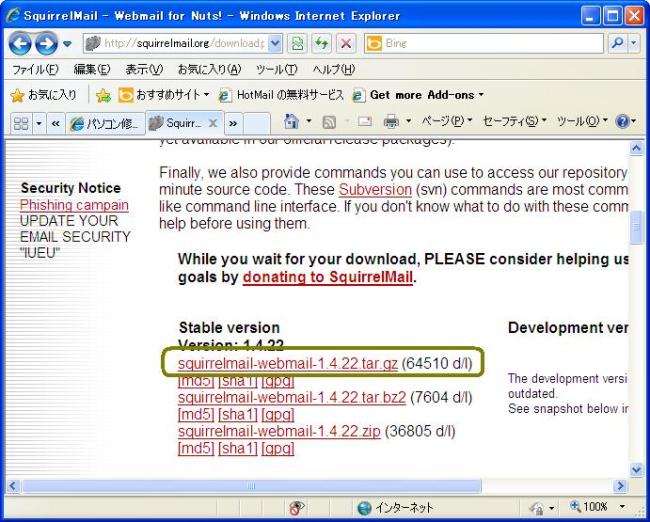
/srv/www/htdocフォルダに、squirrelmail-webmail-1.4.22.tar.gzがコピーされていることを前提にします。
hoge123:/ # cd /srv/www/htdoc hoge123:/srv/www/htdoc # tar zxvf squirrelmail-webmail-1.4.22.tar.gz hoge123:/srv/www/htdoc # mv squirrelmail-webmail-1.4.22 webmail hoge123:/srv/www/htdoc # rm -f tar zxvf squirrelmail-webmail-1.4.22.tar.gz hoge123:/srv/www/htdoc # cd hoge123:/ # chown -R wwwrun:www /srv/www/htdocs/webmail/data/ hoge123:/ # mkdir /srv/www/htdocs/webmail/attach hoge123:/ # chown -R wwwrun:www /srv/www/htdocs/webmail/attach/ |
- プラグインのインストール -
rootディレクトリに戻り、SquirrelMailのプラグインの取得と配置をします。プラグインは SquirrelMail の拡張ツールです。組み込むプラグインの説明は以下のとおりです。
Compatibility:プラグインを全てのバージョンのSquirrelMailで動作させる
Empty Trash :ユーザのTrashフォルダの中を自動的に削除する
Secure Login :ログイン時にSSLを有効にする
View As HTML :メール閲覧をHTML形式またはテキスト形式で行うか選択するリンクを表示する
hoge123:/ # wget http://www.squirrelmail.org/plugins/compatibility-1.3.tar.gz hoge123:/ # wget http://www.squirrelmail.org/plugins/empty_trash-1.4-1.2.2.tar.gz hoge123:/ # wget http://www.squirrelmail.org/plugins/secure_login-1.2-1.2.8.tar.gz hoge123:/ # wget http://www.squirrelmail.org/plugins/view_as_html-3.6-1.4.x.tar.gz hoge123:/ # cd /srv/www/htdocs/webmail/plugins/ hoge123:/srv/www/htdocs/webmail/plugins # tar zxvf /root/empty_trash-1.4-1.2.2.tar.gz hoge123:/srv/www/htdocs/webmail/plugins # tar zxvf /root/secure_login-1.2-1.2.8.tar.gz hoge123:/srv/www/htdocs/webmail/plugins # tar zxvf /root/compatibility-1.3.tar.gz hoge123:/srv/www/htdocs/webmail/plugins # tar zxvf /root/view_as_html-3.6-1.4.x.tar.gz hoge123:/srv/www/htdocs/webmail/plugins # rm -f /root/empty_trash-1.2-1.2.2.tar.gz hoge123:/srv/www/htdocs/webmail/plugins # rm -f /root/secure_login-1.2-1.2.8.tar.gz hoge123:/srv/www/htdocs/webmail/plugins # rm -f /root/compatibility-1.3.tar.gz hoge123:/srv/www/htdocs/webmail/plugins # rm -f /root/view_as_html-3.6-1.4.x.tar.gz |
- SquirrelMailの設定 -
SquirrelMailの設定用プログラムを起動して、変更・保存します。
hoge123:/ # /srv/www/htdocs/webmail/config/conf.pl
- 以下のとおりに記入・追加します。-
quirrelMail Configuration : Read: config.php (1.4.0)
---------------------------------------------------------
Main Menu --
1.  Organization Preferences
2.  Server Settings
3.  Folder Defaults
4.  General Options
5.  Themes
6.  Address Books
7.  Message of the Day (MOTD)
8.  Plugins
9.  Database
10. Languages

D.  Set pre-defined settings for specific IMAP servers

C   Turn color off
S   Save data
Q   Quit

「1.  Organization Preferences」を選択
Command >> 1

SquirrelMail Configuration : Read: config.php (1.4.0)
---------------------------------------------------------
Organization Preferences
1.  Organization Name      : SquirrelMail
2.  Organization Logo      : ../images/sm_logo.png
3.  Org. Logo Width/Height : (308/111)
4.  Organization Title     : SquirrelMail $version
5.  Signout Page           :
6.  Top Frame              : _top
7.  Provider link          : http://www.squirrelmail.org/
8.  Provider name          : SquirrelMail

R   Return to Main Menu
C   Turn color off
S   Save data
Q   Quit

「5.  Signout Page           :」を選択
Command >> 5

When users click the Sign Out button they will be logged out and
then sent to signout_page.  If signout_page is left empty,
(hit space and then return) they will be taken, as normal,
to the default and rather sparse SquirrelMail signout page.

サインアウトした時のページを指定する
[]: /webmail

SquirrelMail Configuration : Read: config.php (1.4.0)
---------------------------------------------------------
Organization Preferences
1.  Organization Name      : SquirrelMail
2.  Organization Logo      : ../images/sm_logo.png
3.  Org. Logo Width/Height : (308/111)
4.  Organization Title     : SquirrelMail $version
5.  Signout Page           : /webmail
6.  Top Frame              : _top
7.  Provider link          : http://www.squirrelmail.org/
8.  Provider name          : SquirrelMail

R   Return to Main Menu
C   Turn color off
S   Save data
Q   Quit

メインメニューに戻る
Command >> r

SquirrelMail Configuration : Read: config.php (1.4.0)
---------------------------------------------------------
Main Menu --
1.  Organization Preferences
2.  Server Settings
3.  Folder Defaults
4.  General Options
5.  Themes
6.  Address Books
7.  Message of the Day (MOTD)
8.  Plugins
9.  Database
10. Languages

D.  Set pre-defined settings for specific IMAP servers

C   Turn color off
S   Save data
Q   Quit

「2.  Server Settings」を選択
Command >> 2

SquirrelMail Configuration : Read: config.php (1.4.0)
---------------------------------------------------------
Server Settings

General
-------
1.  Domain                 : localhost
2.  Invert Time            : false
3.  Sendmail or SMTP       : Sendmail

A.  Update IMAP Settings   : localhost:143 (uw)
B.  Change Sendmail Config : /usr/sbin/sendmail

R   Return to Main Menu
C   Turn color off
S   Save data
Q   Quit

「1.  Domain                 : localhost」を選択
Command >> 1

The domain name is the suffix at the end of all email addresses.  If
for example, your email address is jdoe@example.com, then your domain
would be example.com.

ドメイン名を設定する(メールアドレスの@以降が送信先に表示される)
[localhost]: hoge123.ddo.jp

SquirrelMail Configuration : Read: config.php (1.4.0)
---------------------------------------------------------
Server Settings

General
-------
1.  Domain                 : hoge123.ddo.jp
2.  Invert Time            : false
3.  Sendmail or SMTP       : Sendmail

A.  Update IMAP Settings   : localhost:143 (uw)
B.  Change Sendmail Config : /usr/sbin/sendmail

R   Return to Main Menu
C   Turn color off
S   Save data
Q   Quit

メインメニューに戻る
Command >> r

SquirrelMail Configuration : Read: config.php (1.4.0)
---------------------------------------------------------
Main Menu --
1.  Organization Preferences
2.  Server Settings
3.  Folder Defaults
4.  General Options
5.  Themes
6.  Address Books
7.  Message of the Day (MOTD)
8.  Plugins
9.  Database
10. Languages

D.  Set pre-defined settings for specific IMAP servers

C   Turn color off
S   Save data
Q   Quit

「4.  General Options」を選択
Command >> 4

SquirrelMail Configuration : Read: config.php (1.4.0)
---------------------------------------------------------
General Options
1.  Data Directory              : /var/lib/squirrelmail/prefs/
2.  Attachment Directory        : /var/spool/squirrelmail/attach/
3.  Directory Hash Level         : 0
4.  Default Left Size            : 150
5.  Usernames in Lowercase       : false
6.  Allow use of priority        : true
7.  Hide SM attributions         : true
8.  Allow use of receipts        : true
9.  Allow editing of identity    : true
    Allow editing of name        : true
    Remove username from header  : false
10. Allow server thread sort     : false
11. Allow server-side sorting    : false
12. Allow server charset search  : true
13. Enable UID support           : true
14. PHP session name             : SQMSESSID
15. Location base                :
16. Only secure cookies if poss. : true
17. Disable secure forms         : false
18. Page referal requirement     :

R   Return to Main Menu
C   Turn color on
S   Save data
Q   Quit


Command >> 1

[/var/lib/squirrelmail/prefs/]: /srv/www/htdocs/webmail/data/

SquirrelMail Configuration : Read: config.php (1.4.0)
---------------------------------------------------------
General Options
1.  Data Directory              : /srv/www/htdocs/webmail/data/
2.  Attachment Directory        : /var/spool/squirrelmail/attach/
3.  Directory Hash Level         : 0
4.  Default Left Size            : 150
5.  Usernames in Lowercase       : false
6.  Allow use of priority        : true
7.  Hide SM attributions         : true
8.  Allow use of receipts        : true
9.  Allow editing of identity    : true
    Allow editing of name        : true
    Remove username from header  : false
10. Allow server thread sort     : false
11. Allow server-side sorting    : false
12. Allow server charset search  : true
13. Enable UID support           : true
14. PHP session name             : SQMSESSID
15. Location base                :
16. Only secure cookies if poss. : true
17. Disable secure forms         : false
18. Page referal requirement     :

R   Return to Main Menu
C   Turn color on
S   Save data
Q   Quit


Command >> 2

[/var/spool/squirrelmail/attach/]: /srv/www/htdocs/webmail/attach/


SquirrelMail Configuration : Read: config.php (1.4.0)
---------------------------------------------------------
General Options
1.  Data Directory              : /srv/www/htdocs/webmail/data/
2.  Attachment Directory        : /srv/www/htdocs/webmail/attach/
3.  Directory Hash Level        : 0
4.  Default Left Size           : 150
5.  Usernames in Lowercase      : false
6.  Allow use of priority       : true
7.  Hide SM attributions        : false
8.  Allow use of receipts       : true
9.  Allow editing of identity   : true/true
10. Allow server thread sort    : true
11. Allow server-side sorting   : true
12. Allow server charset search : true
13. Enable UID support          : true
14. PHP session name            : SQMSESSID

R   Return to Main Menu
C   Turn color off
S   Save data
Q   Quit

「7.  Hide SM attributions        : false」を選択
Command >> 7


Hide SM attributions (y/n) [n]: y

SquirrelMail Configuration : Read: config.php (1.4.0)
---------------------------------------------------------
General Options
1.  Data Directory              : /srv/www/htdocs/webmail/data/
2.  Attachment Directory        : /srv/www/htdocs/webmail/attach/
3.  Directory Hash Level        : 0
4.  Default Left Size           : 150
5.  Usernames in Lowercase      : false
6.  Allow use of priority       : true
7.  Hide SM attributions        : true
8.  Allow use of receipts       : true
9.  Allow editing of identity   : true/true
10. Allow server thread sort    : true
11. Allow server-side sorting   : true
12. Allow server charset search : true
13. Enable UID support          : true
14. PHP session name            : SQMSESSID

R   Return to Main Menu
C   Turn color off
S   Save data
Q   Quit

メインメニューに戻る
Command >> r

SquirrelMail Configuration : Read: config.php (1.4.0)
---------------------------------------------------------

Main Menu --
1.  Organization Preferences
2.  Server Settings
3.  Folder Defaults
4.  General Options
5.  Themes
6.  Address Books
7.  Message of the Day (MOTD)
8.  Plugins
9.  Database
10. Languages

D.  Set pre-defined settings for specific IMAP servers

C   Turn color off
S   Save data
Q   Quit

「10. Languages」を選択
Command >> 10

SquirrelMail Configuration : Read: config.php (1.4.0)
---------------------------------------------------------
Language preferences
1.  Default Language       : en_US
2.  Default Charset        : iso-8859-1
3.  Enable lossy encoding  : false

R   Return to Main Menu
C   Turn color off
S   Save data
Q   Quit

「1.  Default Language       : en_US」を選択
Command >> 1

SquirrelMail attempts to set the language in many ways.  If it
can not figure it out in another way, it will default to this
language.  Please use the code for the desired language.

言語を日本語に設定する
[en_US]: ja_JP

SquirrelMail Configuration : Read: config.php (1.4.0)
---------------------------------------------------------
Language preferences
1.  Default Language       : ja_JP
2.  Default Charset        : iso-8859-1
3.  Enable lossy encoding  : false

R   Return to Main Menu
C   Turn color off
S   Save data
Q   Quit

「2.  Default Charset        : iso-8859-1」を選択
Command >> 2

This option controls what character set is used when sending
mail and when sending HTML to the browser.

This option is used only when default language is 'en_US'.


文字コード体系をEUC-JPに設定する
[iso-8859-1]: EUC-JP

SquirrelMail Configuration : Read: config.php (1.4.0)
---------------------------------------------------------
Language preferences
1.  Default Language       : ja_JP
2.  Default Charset        : EUC-JP
3.  Enable lossy encoding  : false

R   Return to Main Menu
C   Turn color off
S   Save data
Q   Quit

メインメニューに戻る
Command >> r

SquirrelMail Configuration : Read: config.php (1.4.0)
---------------------------------------------------------
Main Menu --
1.  Organization Preferences
2.  Server Settings
3.  Folder Defaults
4.  General Options
5.  Themes
6.  Address Books
7.  Message of the Day (MOTD)
8.  Plugins
9.  Database
10. Languages

D.  Set pre-defined settings for specific IMAP servers

C   Turn color off
S   Save data
Q   Quit

「8.  Plugins」を選択
Command >> 8

SquirrelMail Configuration : Read: config.php (1.4.0)
---------------------------------------------------------
Plugins
  Installed Plugins
    1. delete_move_next
    2. squirrelspell
    3. newmail

  Available Plugins:
    4. spamcop
    5. mail_fetch
    6. bug_report
    7. info
    8. compatibility
    9. listcommands
    10. administrator
    11. translate
    12. sent_subfolders
    13. message_details
    14. empty_trash
    15. view_as_html
    16. fortune
    17. abook_take
    18. secure_login
    19. calendar
    20. filters

R   Return to Main Menu
C   Turn color off
S   Save data
Q   Quit

「compatibility」のある番号を選択してください。8 はあくまでこの画面での表示です。)
Command >> 8

SquirrelMail Configuration : Read: config.php (1.4.0)
---------------------------------------------------------
Plugins
  Installed Plugins
    1. delete_move_next
    2. squirrelspell
    3. newmail
    4. compatibility

  Available Plugins:
    5. spamcop
    6. mail_fetch
    7. bug_report
    8. info
    9. listcommands
    10. administrator
    11. translate
    12. sent_subfolders
    13. message_details
    14. empty_trash
    15. view_as_html
    16. fortune
    17. abook_take
    18. secure_login
    19. calendar
    20. filters

R   Return to Main Menu
C   Turn color off
S   Save data
Q   Quit

「empty_trash」を選択(番号が順不同なので注意)
Command >> 14

SquirrelMail Configuration : Read: config.php (1.4.0)
---------------------------------------------------------
Plugins
  Installed Plugins
    1. delete_move_next
    2. squirrelspell
    3. newmail
    4. compatibility
    5. empty_trash

  Available Plugins:
    6. spamcop
    7. mail_fetch
    8. bug_report
    9. info
    10. listcommands
    11. administrator
    12. translate
    13. sent_subfolders
    14. message_details
    15. view_as_html
    16. fortune
    17. abook_take
    18. secure_login
    19. calendar
    20. filters

R   Return to Main Menu
C   Turn color off
S   Save data
Q   Quit

「view_as_html」を選択(番号が順不同なので注意)
Command >> 15

SquirrelMail Configuration : Read: config.php (1.4.0)
---------------------------------------------------------
Plugins
  Installed Plugins
    1. delete_move_next
    2. squirrelspell
    3. newmail
    4. compatibility
    5. empty_trash
    6. view_as_html

  Available Plugins:
    7. spamcop
    8. mail_fetch
    9. bug_report
    10. info
    11. listcommands
    12. administrator
    13. translate
    14. sent_subfolders
    15. message_details
    16. fortune
    17. abook_take
    18. secure_login
    19. calendar
    20. filters

R   Return to Main Menu
C   Turn color off
S   Save data
Q   Quit

「secure_login」を選択(番号が順不同なので注意)
Command >> 18

SquirrelMail Configuration : Read: config.php (1.4.0)
---------------------------------------------------------
Plugins
  Installed Plugins
    1. delete_move_next
    2. squirrelspell
    3. newmail
    4. compatibility
    5. empty_trash
    6. view_as_html
    7. secure_login

  Available Plugins:
    8. spamcop
    9. mail_fetch
    10. bug_report
    11. info
    12. listcommands
    13. administrator
    14. translate
    15. sent_subfolders
    16. message_details
    17. fortune
    18. abook_take
    19. calendar
    20. filters

R   Return to Main Menu
C   Turn color off
S   Save data
Q   Quit

「Q   Quit」を選択
Command >> q

You have not saved your data.
設定内容を保存する
Save?  [Y/n]: y
Data saved in config.php

hoge123:/ # cd /srv/www/htdocs/webmail/plugins/secure_login
hoge123:/srv/www/htdocs/webmail/plugins/secure_login # cp config.php.sample config.php
hoge123:/srv/www/htdocs/webmail/plugins/secure_login # vi config.php

32行目付近、変更します。
$change_back_to_http_after_login = 0;
|
PHP5の拡張モジュールのインストール、Apacheの設定をします。
hoge123:/ # zypper install -y php5-mbstring
hoge123:/ # vi /etc/apache2/conf.d/webmail.conf
下記内容を新規作成します。

Alias /webmail /srv/www/htdocs/webmail
<Location /webmail>
Order Deny,Allow
Deny from all
Allow from 192.168.0.0/24
</Location>

hoge123:/ # /etc/init.d/apache2 restart
Syntax OK
Shutting down httpd2 (waiting for all children to terminate)         done
Starting httpd2 (prefork)                                                       done
|
- ウエブメールのアクセス -
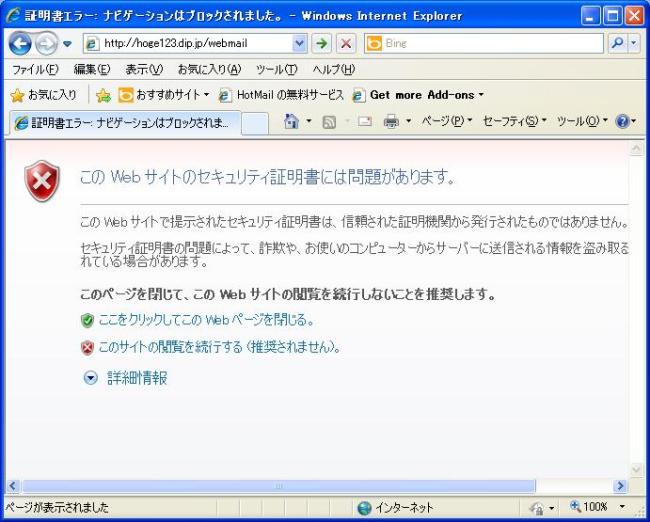
IEのURLにhoge123.ddo.jp/webmail と入力します。自己証明書の関係で、下記証明書エラー表示が出ますが、 「このサイトの閲覧を続行する(推奨されません)」をクリックします。
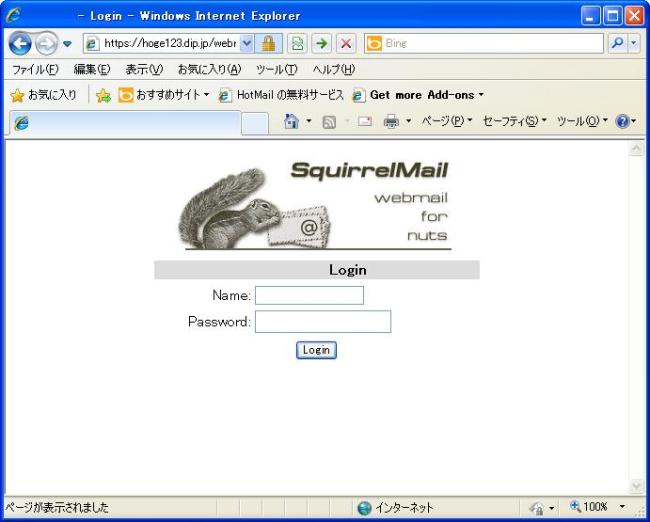
自動的にhttps://hoge123.ddo.jpのURLに変わり、ログイン画面が出てきます。 「Name」にhogehoge と入力、「Password」にhogehogeのパスワードを入力します。
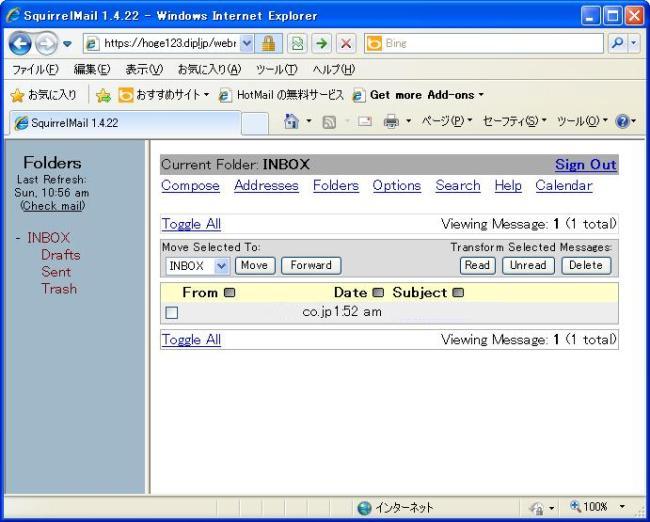
ログインした状態です。
※ 自宅サーバ構築(SUSE Linux Enterprise Server 11)に戻る